DWGSee CAD Dimension-Driven Editing: Two Powerful Tools for Fast Mechanical Revisions
In mechanical drafting, last-minute size changes are routine. You may need to adjust the length of a shaft, modify the wall thickness of a bracket, or revise the diameter of a symmetric flange. Manual stretching and trimming is slow, error-prone, and easy to break alignment. Building full parametric constraint sketches takes hours of setup and has a steep learning curve.
DWGSee CAD delivers two dedicated dimension-driven tools for 2D mechanical drawing: Dimension Driven and DIM Symmetrical Driven. They let you drive geometry by entering new dimension values, without complicated pre-set constraints or parameter tables.
Dimension Driven
How it works
Run the Dimension Driven command, enter your target new dimension value, then window-select the related drawing objects and confirm. Only the selected geometry will resize to match the new value; unrelated lines, annotations, title block and other features stay unchanged.
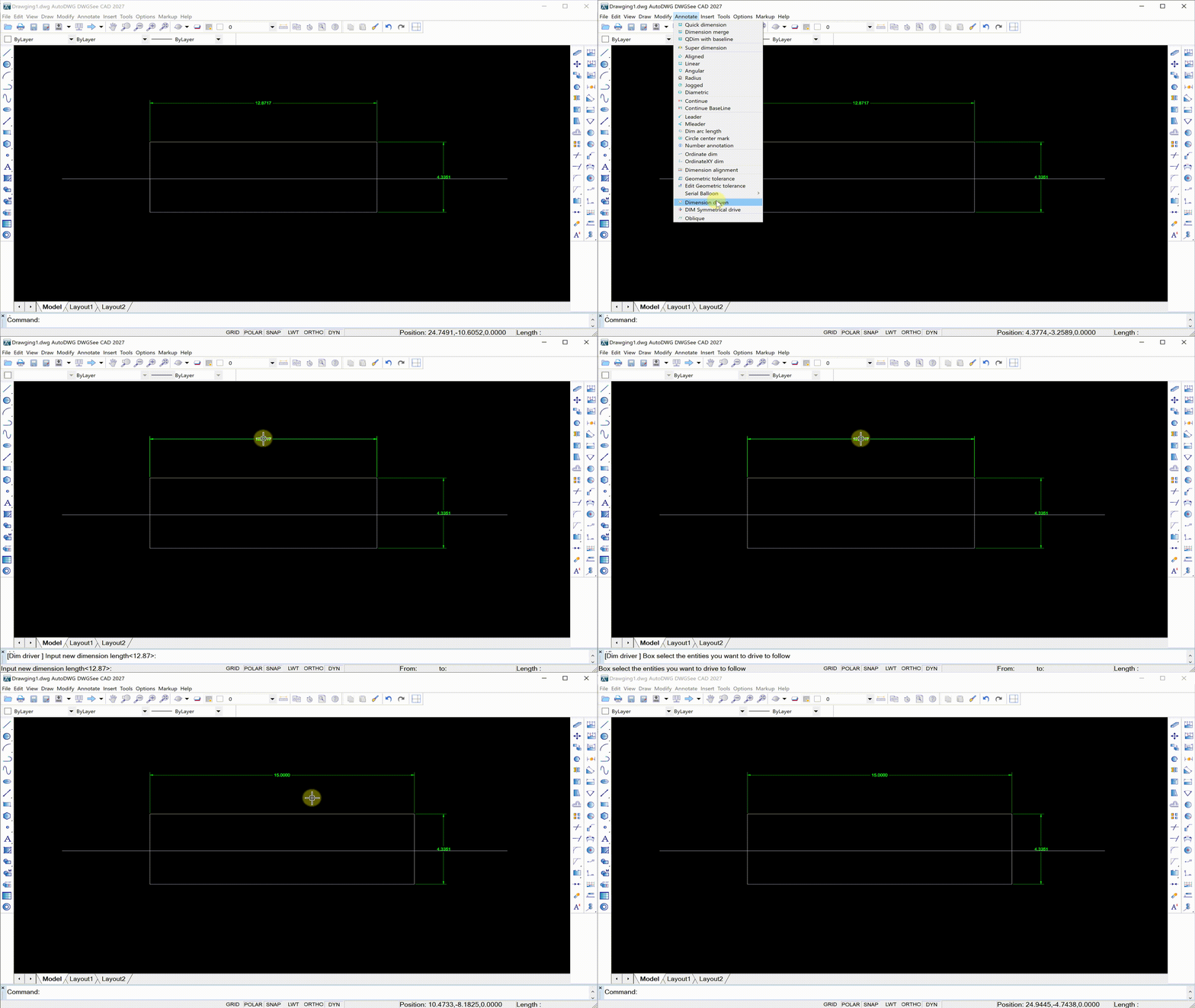
Core application scenarios
- Shaft, bushing, spacer and single-sided mechanical parts: adjust segment length, diameter, thickness directly from dimension values.
- Local revision of non-symmetric structural features: modify slot width, boss height, step size, or clearance distance.
- Sheet metal single-side profile adjustment: change bend length, flange width without re-trimming connected lines.
- Assembly local clearance tuning: adjust the offset of one feature to resolve minor interference, while keeping the rest of the assembly layout intact.
Pain points solved
Traditional editing forces you to grip-stretch lines one by one, then recheck every linked dimension. It is easy to create inconsistent geometry and dimension text. With Dimension Driven, you define the target value first, select the scope, and the tool updates geometry automatically. It keeps modifications isolated, so you will not accidentally shift unrelated features.
DIM Symmetrical Driven
How it works
DIM Symmetrical Driven is built specifically for axisymmetric parts. Input the new symmetric dimension value, box-select the symmetric geometry across the centerline, and the entire symmetric profile updates synchronously. Both sides scale evenly around the center axis, maintaining perfect symmetry automatically.
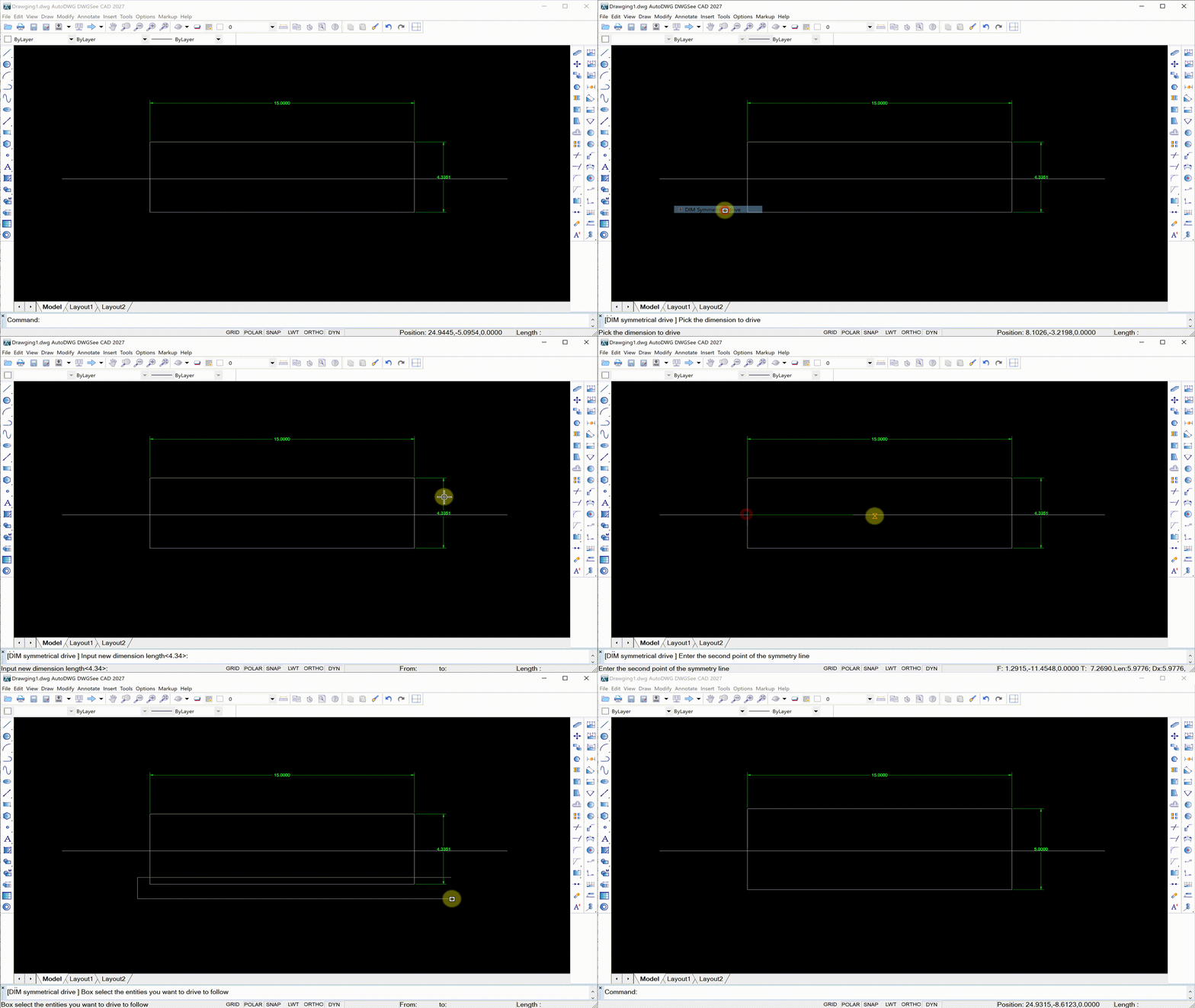
Core application scenarios
- Symmetric brackets, flanges, valve bodies, gland parts: modify overall width, outer diameter, symmetric hole pitch.
- Half-section and centerline-based mechanical views: common for pump parts, couplings, bearing housings.
- Symmetric welded gussets, symmetric base frames: adjust the span size while keeping both sides identical.
- Bolt circle symmetric layouts: revise the symmetric width of paired lugs, and both sides update together.
Pain points solved
The old workflow for symmetric parts: edit one side manually, then mirror or stretch the other side. It is very common to end up with asymmetric profiles, mismatched distances, and repeated manual correction. Many drafters waste time verifying symmetry after every revision. DIM Symmetrical Driven guarantees equal change on both sides around the centerline, preserving design intent in one operation.
Why these two functions stand out
You get two separate, targeted workflows for two common mechanical drawing cases:
- Use Dimension Driven for general, local, one-sided feature resizing.
- Use DIM Symmetrical Driven for axisymmetric parts where balanced, mirrored geometry is required.
No need to pre-apply geometric constraints before editing. There is no complicated parameter table, no sketch rebuild failure. You do not need to rebuild the whole drawing just for a simple size change. DWGSee CAD remains lightweight, fully compatible with standard DWG/DXF files.
For mechanical drafters, job shops and design teams that frequently handle revision requests, these two dimension-driven tools cut repetitive manual editing, reduce drawing errors, and let you focus on engineering design instead of line adjustment. When a client asks “make this dimension larger”, now you have the right tool whether the part is a single-sided feature or a symmetrical component.