GRADIENT #
Overview #
Fills a closed boundary with a gradient fill. A gradient is a smooth transition between two or more colors, used to replace solid hatch patterns for visual rendering.
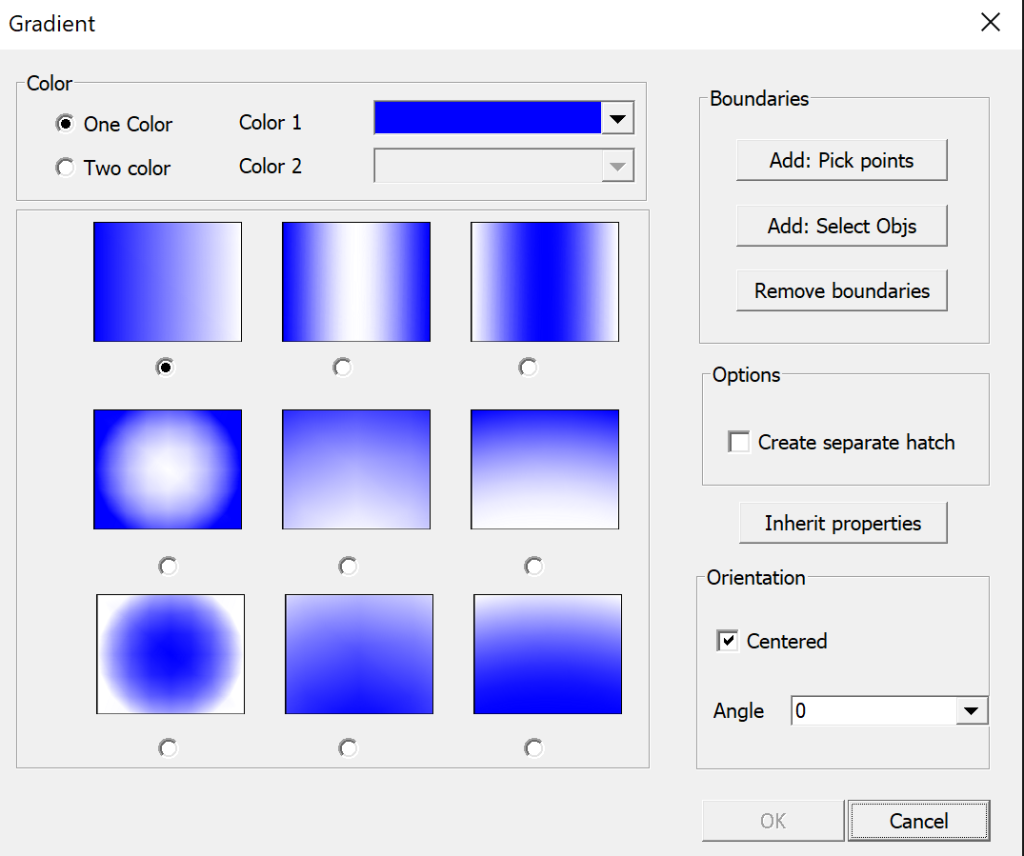
Command Prompt Sequence #
- Select boundary objects or pick internal point to define the fill area.
- Choose gradient type: linear, radial, spherical, curved, etc.
- Set color 1 and color 2, adjust angle, offset, and transparency.
- Preview and confirm to create the gradient fill object.
Key Options #
- Pick Point: Click inside a closed area to automatically detect the boundary.
- Select Objects: Manually select closed lines, polylines, circles or other shapes as the boundary.
- Gradient Pattern: Predefined gradient distribution styles.
- Angle: Rotates the direction of the gradient transition.
- Transparency: Controls the opacity of the gradient fill.
- Centered: Makes the gradient symmetrical from the center of the boundary.
Notes #
- The boundary must be fully closed; gaps will cause gradient creation failure.
- Gradient objects are separate entities, which can be moved, edited or deleted independently.
- Gradient fills are for presentation purposes and do not affect dimension calculation.
Application Scenarios #
Use GRADIENT to add realistic shaded effects to architectural elevations, sectional views, product schematic diagrams and design renderings without external image editors.


