DIMSYMDRIVER #
Overview #
The DIMSYMDRIVER command in DWGSeeCAD is a symmetrical dimension driving tool. It updates selected dimension value and drives associated geometry to scale symmetrically about a defined symmetry line. It is a DWGSeeCAD exclusive extended command for quick modification of symmetrical mechanical sketches.
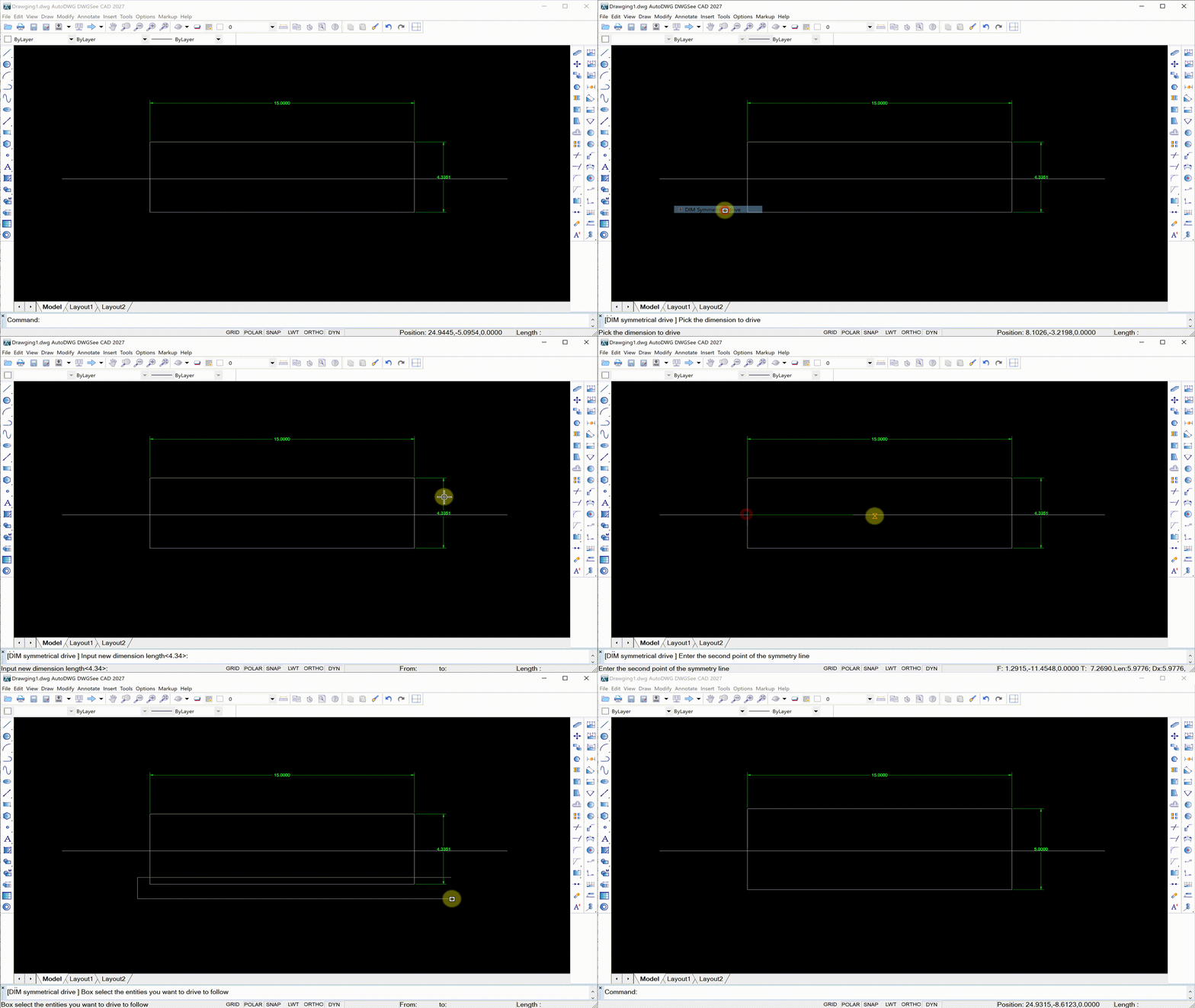
Command Prompt Workflow #
- Enter DIMSYMDRIVER on the command line and press Enter.
- Prompt: [DIM symmetrical drive ] Pick the dimension to drive: Select the target dimension that will control the symmetrical change.
- Prompt: [DIM symmetrical drive ] Input new dimension length<xxxx>:: Enter the target new length value for this dimension.
- Prompt: [DIM symmetrical drive ] Enter the first point of the symmetry line: Specify the first endpoint of the symmetry axis.
- Prompt: [DIM symmetrical drive ] Enter the second point of the symmetry line: Specify the second endpoint to finish the symmetry axis.
- Prompt: [DIM symmetrical drive ] Box select the entities you want to drive to follow: Use window selection to pick all geometry that needs to be updated symmetrically.
- The selected objects will automatically adjust symmetrically to match the new dimension value along the symmetry line.
Usage Notes #
- DIMSYMDRIVER modifies geometry symmetrically based on the dimension you specify. All selected entities will maintain symmetry relative to the defined symmetry line.
- It works well for symmetrical parts such as flanges, brackets and symmetric profiles.
- This is a custom DWGSeeCAD extended command and is not built into native AutoCAD.
Application Scenarios #
Use DIMSYMDRIVER when you need to adjust the overall size of symmetrical drawings. Change one controlling dimension, define the symmetry axis, and all associated shapes update synchronously while keeping symmetry intact, which saves repetitive editing work for mechanical design.


